Showing posts with label firefox. Show all posts

Wednesday, July 21, 2010

Epic - The Indian style of Browsing

Epic is a free web browser based on Firefox that is currently available only for Windows operating system. Epic is the India’s first web browser that provides its users with a free Anti Virus and you can be sure that the version will be updated.
Epic In Short:
the first-ever web browser for India
the world's only sidebar apps browser

the world's only antivirus browser

Features:
  1. Epic’s built is based on Mozilla platform and open source software technology.
  2. The main feature of Epic is its Sidebar. It has got many apps/widgets in it. 
  3. In Epic the user can simultaneously access the apps in the Sidebar while browsing his favorite sites.
  4. With the help of Epic, the user can browse the files in My Computer, listen to the Latest Soundtracks, check the News updates, Live Cricket Scores, search for Jobs, Type in any Indic Languages, change the Themes and Wallpapers and more. 
  5. The main features of Epic are: Maximum Security, Malicious Website Warnings, Anti-Publishing Protection, Fast Browsing and Downloads and many more. 
  6.  Users can directly type in Indian languages with the built-in widget provided in the side bar.
  7. Built in Word Processor "Epic Write"
  8. 1500+ Indian Themes and Wallpapers. 
  9. Latest Film Songs. Live Cricket Scores. News from a Dozen+ Leading Sources. Regional and Hindi Language News. Live TV. Stock Quotes. Events. Videos. Even a Daily Joke.
  10. Directly access your gmail,yahoo from sidebar.(Mobile version of the page will be displayed so you wont get all the features like chat,buzz etc if you access from side bar... but it will be handy if you want to just check or send any new mails.) and you can even access social networking sites like twitter, Facebook.

      Check out More Features of EPIC

      Friday, July 9, 2010

      "Orange firefox4 tab" on XP

      On many blogs i've seen that the orange button is only available for vista and 7.... but NO.... you can even get it on XP. Just go to view-> toolbars and uncheck the "menubar" that's it... now you will get an orange firefox tab like in vista and 7

      Firefox 4: Beta

      Mozilla recently released the first beta version of Firefox 4,The new Firefox offers  improved security and better page rendering, and it also supports WebM, Google's new open video standard project.

      New MENU Style.
      In Windows Vista or Windows 7, one of the first thing to notice is that the menus have moved to a single orange Firefox button on the upper-left side.(This feature is not available on Mac , Linux, and Windows XP )
      The stop and reload functions are also merged into one button on the far left. Users of any operating system will see this new feature.


      Tabs on Top.

      Like Google Chrome, Firefox 4 beta now has the browser tabs pointing upward by default 

      DOWNLOAD FIREFOX 4 Beta  (Keep in mind that Firefox 4 is in Beta, and you may have to encounter a few unexpected bugs and crashes.)

      Sunday, June 20, 2010

      Remove ads on Facebook

      Facebook users using Firefox web browser can use this hack script for Greasemonkey add-on to remove annoying ads in Facebook. Of course, it’s possible to use specialized ad blocker such as AdBlock Plus,but some prefer this because it uses very small amount of your system resources.

      Install Greasemonkey
      Then install this Script Remove All Facebook Ads

      Tuesday, June 15, 2010

      DownThemAll

      DownThemAll is a powerful yet easy-to-use Mozilla Firefox extension that adds new advanced download capabilities to your browser.

      DownThemAll lets you download all the links or images contained in a webpage and much more: you can refine your downloads by fully customizable criteria to get only what you really want.
      DownThemAll is all you can desire from a download manager: it features an advanced accelerator that increases speed up to 400%, it allows you to pause and resume downloads at any time and, last but not least, it's fully integrated into your favorite browser!
      Add DownThemAll to Firefox
      For more information see Features page.

      Saturday, January 23, 2010

      Firefox 3.6 - New Features

      Mozilla released Firefox 3.6, the latest version of its popular browser.it includes a number of under-the-hood improvements, and a handful of changes that you might discover as you use it.

      Plug-in Check for Better Security

      Firefox 3.6 can now detect whether any of your installed browser plug-ins (Flash, etc...) are out of date. This is importaant because Cybercriminals often use bugs in outdated versions of  some plugins--particularly Flash and QuickTime--to attack your PC

      Full-Screen Video

      You can now watch certain types of videos in full screen with Firefox 3.6. If the video is in the Oog Vorbis format, you can right-click the video and select an option to see it in full-screen.
      The downside to this feature, of course, is that it only works with certain videos,

      Under the Hood

      Firefox 3.5 was a good deal faster than earlier Firefox versions. Mozilla claims that Firefox 3.6 is even faster, with improvements to JavaScript performance in particular, which should result in faster load times for Web pages and Web apps. Firefox also improves support for some of the latest Web design technologies, which should make it easier for designers to create better, more attractive sites.

      Skins Come to Firefox

      Firefox Personas. Personas are basically interface skins that you can apply with one click, and they're actually pretty similar to the skins available for the Google Chrome browser. Mozilla has a gallery of personas at getpersonas.com that features over 35,000 designs to choose from.

      Sunday, January 17, 2010

      Firefox 3.7 changed to 4.0

      Mozilla has dropped the schedule of Firefox 3.7 and will release Firefox 4.0 instead of firefox 3.7 after Firefox 3.6. So Firefox 4.0 will come most probably at the end of this year or early 2011. Firefox 3.6, codenamed Namoroka. Development for this version started on December 1, 2008 and it is planned for release in early 2010. This release will use the new Gecko 1.9.2 rendering engine.Firefox 4.0 has been tentatively scheduled to use the Gecko 1.9.4 rendering engine and will offer a new user interface and multi-touch gesture support.

      According to Mike Beltzner, director of Firefox.
      Rather than add features to Firefox only in once- or twice-a-year upgrades, Mozilla will quietly insert some functionality via its regular security updates, which appear every four to six weeks. That means Firefox 3.7, which was slated for a second quarter release, has been dropped from the development schedule. We learned an awful lot about what slows down our schedule, and that will help us plan future releases.

      Monday, January 11, 2010

      Firefox updated to 3.5.7

      The Mozilla Foundation has updated its Firefox browser to version 3.5.7. This is meant to make the software a more stable as well as a safer platform. In this regard the recently released Firefox 3.5.7 update fixes several stability issues and several security issues. To be more precise, it fixes a total of 7 security issues – 3 of which have been given the rating of critical.
      The 3 critical security issues that Firefox 3.5.7 addresses are:
      MFSA 2009-67
      MFSA 2009-66
      MFSA 2009-65
      If you are already using firefox click Help -> Check for updates to manually update the browser.
      For others Firefox 3.5.7 download location is available here.

      Tuesday, December 8, 2009

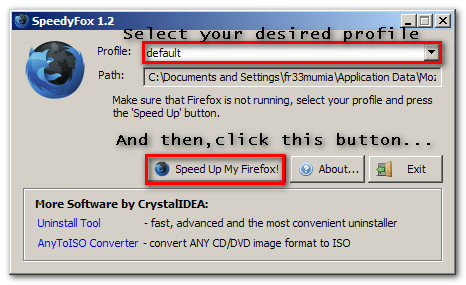
      Speed up Firefox using SpeedyFox

      There are some way to speed up firefox setting. One of the way using software. One of the software can be used to optimize firefox setting is SpeedyFox. Firefox uses the SQLite database to store settings and other important things (a database for “profile”). SpeedyFox just compact the database. If Database is small  Firefox is faster.
      The speedup that occurs after you use SpeedyFox will vary depending on how long you used the specific profile that you intend to speed up Firefox with SpeedyFox.

      How to use SpeedyFox
      • Close Firefox.
      • Run SpeedyFox
      • Select the profile you want to speed up
      • Leave profile as “default” if u have not created any new profiles.
      • Click on “Speed Up My Firefox” button to optimize firefox setting


        SpeedyFox can be downloaded from the following link
        Download SpeedyFox

        Twitter Delicious Facebook Digg Stumbleupon Favorites More

         
        Developed by Avinash | My Site