Showing posts with label freeware. Show all posts

Wednesday, July 21, 2010

Epic - The Indian style of Browsing

Epic is a free web browser based on Firefox that is currently available only for Windows operating system. Epic is the India’s first web browser that provides its users with a free Anti Virus and you can be sure that the version will be updated.
Epic In Short:
the first-ever web browser for India
the world's only sidebar apps browser

the world's only antivirus browser

Features:
  1. Epic’s built is based on Mozilla platform and open source software technology.
  2. The main feature of Epic is its Sidebar. It has got many apps/widgets in it. 
  3. In Epic the user can simultaneously access the apps in the Sidebar while browsing his favorite sites.
  4. With the help of Epic, the user can browse the files in My Computer, listen to the Latest Soundtracks, check the News updates, Live Cricket Scores, search for Jobs, Type in any Indic Languages, change the Themes and Wallpapers and more. 
  5. The main features of Epic are: Maximum Security, Malicious Website Warnings, Anti-Publishing Protection, Fast Browsing and Downloads and many more. 
  6.  Users can directly type in Indian languages with the built-in widget provided in the side bar.
  7. Built in Word Processor "Epic Write"
  8. 1500+ Indian Themes and Wallpapers. 
  9. Latest Film Songs. Live Cricket Scores. News from a Dozen+ Leading Sources. Regional and Hindi Language News. Live TV. Stock Quotes. Events. Videos. Even a Daily Joke.
  10. Directly access your gmail,yahoo from sidebar.(Mobile version of the page will be displayed so you wont get all the features like chat,buzz etc if you access from side bar... but it will be handy if you want to just check or send any new mails.) and you can even access social networking sites like twitter, Facebook.

      Check out More Features of EPIC

      Friday, July 9, 2010

      Firefox 4: Beta

      Mozilla recently released the first beta version of Firefox 4,The new Firefox offers  improved security and better page rendering, and it also supports WebM, Google's new open video standard project.

      New MENU Style.
      In Windows Vista or Windows 7, one of the first thing to notice is that the menus have moved to a single orange Firefox button on the upper-left side.(This feature is not available on Mac , Linux, and Windows XP )
      The stop and reload functions are also merged into one button on the far left. Users of any operating system will see this new feature.


      Tabs on Top.

      Like Google Chrome, Firefox 4 beta now has the browser tabs pointing upward by default 

      DOWNLOAD FIREFOX 4 Beta  (Keep in mind that Firefox 4 is in Beta, and you may have to encounter a few unexpected bugs and crashes.)

      Monday, July 5, 2010

      Maverick Meerkat(Ubuntu 10.10) Alpha 1- Download

      Note: This is an alpha release. The final stable version will be released on October 10, 2010.

      Upgrading from Ubuntu 10.04 LTS

      To upgrade from Ubuntu 10.04 LTS on a desktop system, press Alt+F2 and type in "update-manager -d" (without the quotes) into the command box. Update Manager should open up and tell you: New distribution release '10.10' is available. Click Upgrade and follow the on-screen instructions.

      New features in Maverick:

      Feature development for Maverick has started. Please see the Maverick blueprint list for details.

      Updated Packages:

      GNOME

      The GNOME base platform has been updated to the current 2.31 versions. This particularly includes the new dconf and gsettings API. Evolution was updated to the 2.30 version, which operates much faster compared to the version in Ubuntu 10.04 LTS.

      KDE

      KDE was updated to the current 4.5 beta 1 release.

      Qt

      Qt was updated to the current 4.7 beta release.

      Linux kernel 2.6.34

      Alpha 1 includes the 2.6.34-5.12 kernel based on 2.6.34.

      Download:

       Ubuntu Desktop, Server, and Netbook

      Kubuntu Desktop and Netbook

      Xubuntu


      Ubuntu Studio

      Wednesday, June 16, 2010

      Opera 10.60 beta

      The latest version of browser from Opera have been released, with speed improvements and better HTML5 compliance.
      Company claims that they has made the browser 50 percent faster than the previous version.
      The beta also adds support for many HTML5 features. These include support for the next-generation video and audio codec WebM, geolocation compatibility, Web Workers and App Cache.
      The features of Opera 10.60 can be read here.

      Tuesday, June 15, 2010

      DownThemAll

      DownThemAll is a powerful yet easy-to-use Mozilla Firefox extension that adds new advanced download capabilities to your browser.

      DownThemAll lets you download all the links or images contained in a webpage and much more: you can refine your downloads by fully customizable criteria to get only what you really want.
      DownThemAll is all you can desire from a download manager: it features an advanced accelerator that increases speed up to 400%, it allows you to pause and resume downloads at any time and, last but not least, it's fully integrated into your favorite browser!
      Add DownThemAll to Firefox
      For more information see Features page.

      Saturday, May 22, 2010

      BOSS - Bharat Operating System Solutions

          BOSS (Bharat Operating System Solutions) GNU/Linux distribution developed by  C-DAC (Centre for Development of Advanced Computing) derived from Debian for enhancing the use of Free/ Open Source Software throughout India. BOSSGNU/Linux - a key deliverable of NRCFOSS has upgraded from Entry level server to advanced server. It supports Intel and AMD x86/x86-64 architecture. BOSS GNU/Linux advanced server has unique features such as Web server, proxy server, Database server, Mail server, Network server, File and Print server, SMS server, LDAP server. BOSS GNU/Linux advanced server is comprised with administration tool such as webmin which is a web based interface, Gadmin, PHP myadmin,  PHP LDAP admin,  PG admin.
      BOSS GNU/Linux Version 3.0 is coupled with GNOME and KDE Desktop Environment with wide Indian language support & packages, relevant for use in the Government domain. Currently BOSS GNU/Linux Desktop is available in almost all the Indian Languages such as Assamese, Bengali, Gujarati, Hindi, Kannada, Malayalam, Marathi, Oriya, Punjabi, Sanskrit, Tamil, Telugu, Bodo, Urdu, Kashmiri, Maithili, Konkani, Manipuri  which will enable the mainly non-English literate users in the country to be exposed to ICT and to use the computer more effectively.

      BOSS CD pack:

      OSS CD pack consists of 3 CDs. The Install CD which gives you a BOSS Desktop in your system, a Live CD which allows you to try BOSS without installing on the Hard Disk and without disturbing your existing OS and the Utility CD which has some of the extra packages like OpenOffice fonts, Apache web server, scripting languages etc.

      1) INSTALL CD

      To use the INSTALL CD, you need to have a minimum of 4.0 GB of Harddisk space, 512 MB of RAM and a CD-ROM drive. Insert the BOSS GNU/Linux install CD into the CD drive, restart your computer and boot from CD by editing the BIOS setup. The BOSS GNU/Linux splash image is displayed as the starting screen and the cursor blinks at the boot: prompt. Press Enter and follow the instructions. You can proceed with the default installation by clicking “Next” button or do custom installation.

      2) LIVE CD

      The BOSS GNU/Linux Live project aims to create BOSS Live CDs, DVDs and USBs  for all the releases of BOSS (and newer). BOSS Live is Linux CD based on Debian GNU/Linux. BOSS LIVE CD is a GNU/Linux distribution that boots and runs completely from CD. It includes recent linux software and desktop environments, with programs such as OpenOffice.org, The Gimp, Mozilla, Pidgin, Totem and hundreds of other quality open source programs. It also includes document converter, Presentation tool, 3D effects, bluetooth devices support and Input method for Indian Languages.

      3) UTILITY CD

      This CD consists of workstation related packages, like Apache webserver, egroupware collaboration tool, webmin – GUI for administrative tasks PHP, Mysql, Postgresql, Educational tools, Openoffice fonts and some other language fonts ,etc. You can find out the usage of the Utility CD and about these extra packages below. This BOSS Utility CD or Addon CD  contains the packages related to workstation.

      Download BOSS

      Friday, May 14, 2010

      How to: Customize Ubuntu Installation disc (Live Cd)

      You may wish to customise the Ubuntu Desktop LiveCd to:
      • make your own Linux / Ubuntu distribution
      • show off a particular application
      • localise to a certain language
      • remove software packages
      • add software packages
      • update software packages
      • change system defaults (theme, icons, desktop background, panels, browser homepage, etc)

      Note: This can be used only for customizing Desktop edition.

      System Requirements:

      • At least 3-5 GB of free space
      • At least 512 MB RAM and 1 GB swap (recommended)

      • squashfs-tools

      • genisoimage, which provides mkisofs

      • An Ubuntu kernel with squashfs support (present in Ubuntu 6.06 and later)

        Click here for the Process

      Thursday, April 22, 2010

      UBUNTU 10.04 Time Line

      Social Networking Features in ubuntu 10.04

      Social Networking Features


      Desktop social networking support is implemented through integration with Gwibber, an open source microblogging client that supports nine services, including Twitter, Facebook, Digg, Flickr, and FriendFeed. The Gwibber technology appears to users through a new MeMenu added to the operating system user interface.

      The OS ships with Firefox 3.6, but changes the default search engine from Google to Yahoo, as part of a revenue sharing arrangement between Canonical and Yahoo. Also included is the OpenOffice 3.2 open source productivity suite.

      Canonical warns that the beta should not be installed on production systems. A full list of features and known bugs is available here.


      Lucid Lynx's desktop version also integrates Canonical's Ubuntu One (U1) music store, now in limited beta test. The store will allow users to purchase music through Rhythmbox, the default music player for the operating system.

      Ubuntu 10.04 Lucid Lynx

      "Lucid Lynx" is the code name for Ubuntu 10.04, scheduled for release on 29 April 2010.


                  One of the first things any user will notice in the pic above, whether new to Ubuntu or a veteran Linux user, is the button layout. Ubuntu 10.04, also known as "Lucid Lynx," has opted for a left-side, Mac-style lineup of maximize/restore, minimize, and close buttons, but switched around the order, so that the close/kill button is the right-most button on a left-hand button panel. That is certainly new, and will take some getting used to.
                  As predicted, Ubuntu 10.04 will have a built-in music store that ties together with the free 2 GB of Ubuntu One cloud storage given to each user. Ubuntu One's music store is built into the Rhythmbox music player, and once you try to access it, Ubuntu will install the proper MP3 codecs so you can, you know, play MP3s.

      Current Stable Versions of UBUNTU

      Version

      Code name

      Release date

      End of life date

      Ubuntu 9.10


      April 2011

      Ubuntu 9.04


      October 2010

      Ubuntu 8.10


      April 2010

      Ubuntu 8.04.4 LTS


      April 2011 (Desktop)


      April 2013 (Server)

      Ubuntu 8.04.3 LTS


      Ubuntu 8.04.2 LTS


      Ubuntu 8.04.1 LTS


      Ubuntu 8.04 LTS


      Ubuntu 6.06.2 LTS


      June 2011 (Server)

      Ubuntu 6.06.1 LTS


      Ubuntu 6.06 LTS

      Saturday, January 30, 2010

      Download freeware with a single click

      >> A sample from 100-downloads.com <<
      AdBlock Plus Get rid of annoying ads and banners with this Firefox add-on Website Download
      Google Chrome 4 Browser that combines a minimal design with sophisticated technology to make the web faster, safer, and easier Website Download
      Avast Antivirus 5.0 Anti virus utility Website Download
      AVCHDCoder Convert MKV, M2TS, Blu-ray and WMVHD files to AVCHD Website Download
      Firefox 3.6 Latest version of the Mozilla Firefox Browser Website Download
      Foobar2000 (final) Advanced audio player Website Download
      UBitMenu Classic Menu and Toolbars in Office 2007 / Office 2010 Website Download
      Rebel EFI (Live CD ISO) Install multiple operating systems (such as Mac OS X) on a single pc system Tags: Snow Leopard Website Download
      ORF-Ski Challenge '10 Skiing game with online competition Website Download
      America's Army Better-than-average online multiplayer shooter Website Download


      http://100-downloads.com : Download Freeware with just a single click....

      Sunday, January 17, 2010

      7stacks

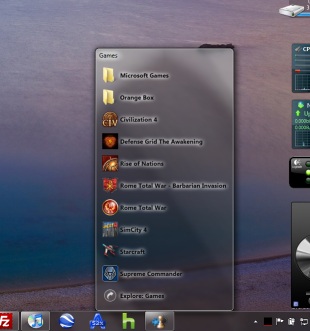
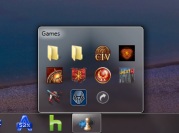
      7stacks is an easy to use, free app that lets Windows 7 (and Vista and XP) users have "stacks" of icons in their Taskbar (in 7) or QuickLaunch Toolbar (in Vista and XP). By using stacks, users can reduce icon clutter, and combine a group of related icons into a single icon. For instance, if you use application suites such as Microsoft Office, OpenOffice, or Adobe CS4, you can have all the suite's icons combined into one icon!
      You can also use it to browse and access documents within a folder very quickly. Usually, when you want to edit a series of frequently used documents, you'd have to either launch the app, and go to File|Open, or open the (My) Computer icon and go into your (My) Documents folder and pick the file you want. With 7stacks, just create a stack to that document's folder, and open that document in a couple of clicks.
        
      Download 7Stacks

      Features:
      • In 7 and Vista, 7stacks uses Aero, making the stacks look like part of Windows itself.
      • Browse subfolders within a stack, just like in OS X Snow Leopard.
      • 3 different styles of stacks: Normal, Grid, and Menu
        • Normal displays a stack of icons vertically, with a text description next to it.
        • Grid displays a "squarish" grid of icons only; useful when displaying a large number of items like document folders.
        • Menu displays a cascading menu of items, with a very small icon and a name next to it. Hover over subfolders to browse inside those folders.
      • In Windows 7, create a new stack by right-clicking on any stack and selecting "Create New Stack" from the JumpList entry.
      • In Menu mode, 7stacks doesn't even need to be in a toolbar. You can use it right from your desktop, or any other folder.
      • Pin up to 10 different stacks on the Windows 7 taskbar 


      Twitter Delicious Facebook Digg Stumbleupon Favorites More

       
      Developed by Avinash | My Site